ChatSend Blog
WhatsApp Webhooks: Delivery, Replies, and Failure Handling
A practical guide to structuring WhatsApp webhooks for delivery visibility, inbound reply workflows, and safer failure handling.
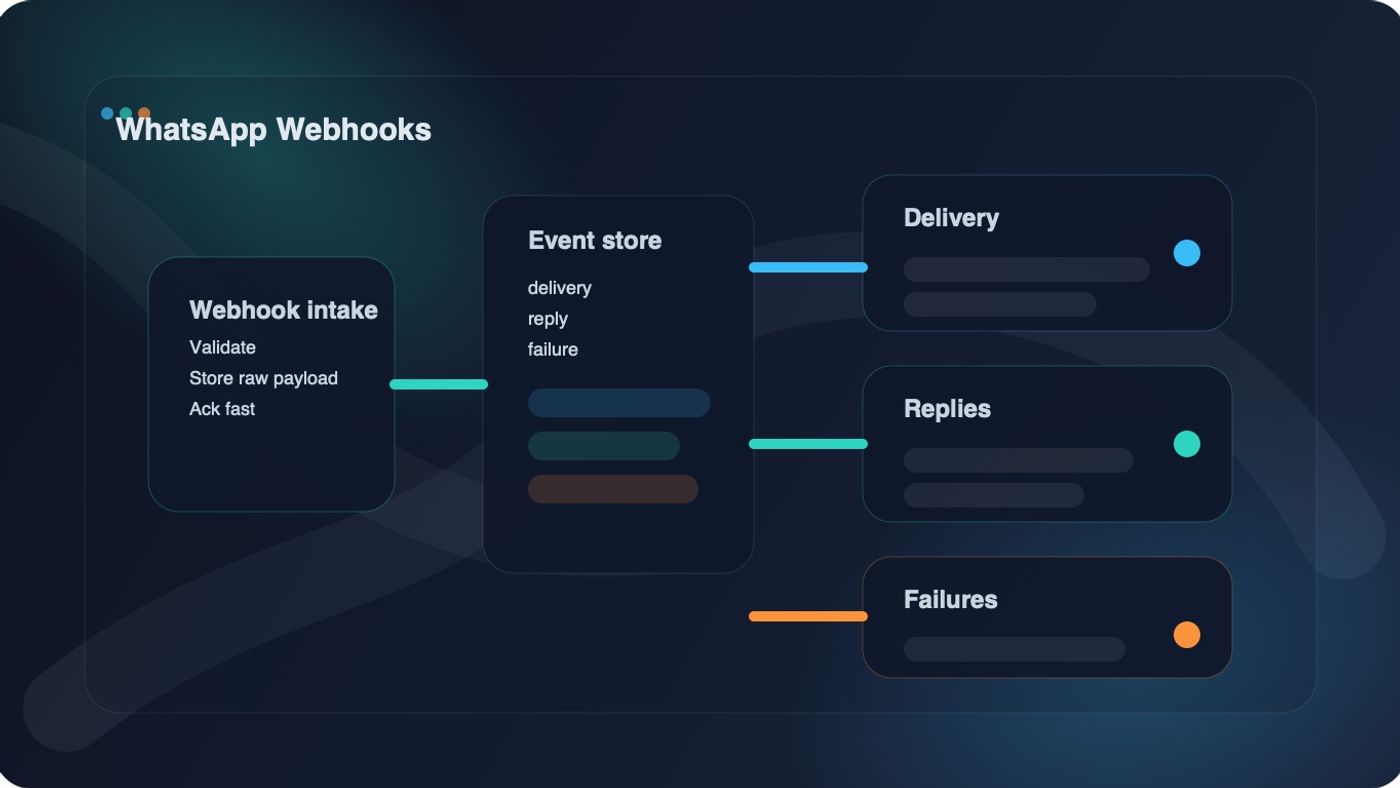
If you are integrating messaging into a real product, WhatsApp webhooks matter almost as much as the send endpoint.
Sending a message is only the beginning. The real operational system starts when your backend needs to answer questions like:
- was the message delivered
- did the customer reply
- did the send fail
- what should happen next
That is why a serious WhatsApp integration needs a webhook strategy for delivery, replies, and failure handling before volume grows.
This guide explains how to structure that strategy so your event pipeline stays usable under real production conditions.
Quick answer: what WhatsApp webhooks should do
WhatsApp webhooks should help your backend receive delivery updates, inbound replies, and failure signals quickly enough to update internal state, trigger automations, and surface problems before they turn into support issues.
Why send responses are not enough
A lot of teams stop at the send response.
That is a mistake.
An immediate send response tells you that your request was accepted by the send path. It does not fully replace the downstream event stream that tells you what happened after the request left your application.
Without webhooks, teams usually end up with one of these bad patterns:
- no reliable delivery visibility
- manual inbox checking for customer replies
- weak failure diagnosis
- brittle polling jobs that still miss context
Webhook events close that gap.
In the current ChatSend product surface, webhook notifications are configured at the session layer through enableWebhook and webhookUrl, which makes webhook design part of your session operating model rather than an afterthought bolted onto one endpoint later.
The three event buckets that matter most
If you want a cleaner webhook system, group WhatsApp events into three buckets first.
1. Delivery events
Delivery events help answer:
- was the message sent
- was it delivered
- was it read
- did status change after the initial send response
These events matter for operational reporting, customer support, and workflow branching.
For example:
- an order confirmation can stay in sent until a later event confirms delivery
- a reminder campaign can treat read differently from delivered
- a support team can inspect whether a complaint is really a delivery problem or a content problem
2. Reply events
Reply events tell you that the conversation is no longer only outbound.
This matters because the system usually needs to change behavior once a customer responds. You may need to:
- stop additional reminders
- open a support task
- attach the reply to a CRM timeline
- assign the conversation to a human
Many teams build the outbound side first and only later realize that reply handling is where the real operational complexity begins.
3. Failure events
Failure events are the difference between a resilient messaging system and a black box.
You need a clear path for:
- transport or upstream send failures
- invalid configuration
- disconnected sessions
- malformed or rejected requests
If failures are treated as generic noise, operators cannot tell whether the problem is transient, configuration-related, or business-critical.
A practical webhook architecture
The safest webhook design is simple:
- receive the event
- validate it
- store the raw event
- acknowledge quickly
- process downstream asynchronously
That pattern prevents your webhook endpoint from becoming a slow, fragile do-everything function.
In other words, your webhook route should be an intake layer, not your full business workflow engine.
How to receive WhatsApp webhooks safely
A stable receiver should do four things well.
1. Parse safely
Your endpoint should reject malformed payloads instead of pretending they are valid.
2. Authenticate or constrain the source
If your provider supports request signing, verify the signature. If the provider does not yet expose a signing model you can rely on, at least protect the endpoint with an unguessable path, strict logging, and server-side controls around what you accept and store.
3. Return fast
Do not block the webhook response on long database writes, CRM syncs, analytics fan-out, or notification side effects when you can avoid it.
4. Preserve the raw payload
Even if your normalized model changes later, the raw webhook event is often the fastest way to debug a production discrepancy.
A minimal Node.js webhook receiver
The exact payload shape depends on the provider and your integration contract, so the safest first version is a receiver that validates, stores, and acknowledges cleanly.
import express from "express";
const app = express();
app.use(express.json({ limit: "1mb" }));
app.post("/webhooks/chatsend", async (req, res) => {
const event = req.body;
if (!event || typeof event !== "object") {
return res.status(400).json({ error: "invalid webhook payload" });
}
try {
await saveRawWebhookEvent({
provider: "chatsend",
receivedAt: new Date().toISOString(),
payload: event,
});
res.status(200).json({ received: true });
queueWebhookProcessing(event).catch((error) => {
console.error("Webhook processing failed:", error);
});
} catch (error) {
console.error("Webhook storage failed:", error);
res.status(500).json({ error: "webhook storage failed" });
}
});
app.listen(3000, () => {
console.log("Webhook receiver listening on :3000");
});
This is intentionally boring.
That is good. Boring webhook receivers are usually the reliable ones.
How to process delivery events
Delivery updates should change internal message state, not just produce logs.
A healthy delivery-event workflow usually does this:
- match the webhook event to your outbound message record
- update the latest status
- record a status timeline
- trigger any status-based automation
For example:
- delivered can update customer-facing status
- read can inform follow-up timing
- repeated non-delivery patterns can alert an operator
If you only keep the latest state and throw away the timeline, debugging later gets much harder.
How to process reply events
Reply events should route into a different branch than delivery updates.
Do not mix them into the same flat handler and hope future logic stays readable.
A good reply workflow usually includes:
- conversation or contact matching
- reply persistence
- automation suppression
- routing to human follow-up when needed
One common example:
- outbound reminder is sent
- user replies
- reminder queue is canceled
- conversation is attached to the customer record
- support or sales follow-up is created
That is much cleaner than letting the system keep sending because it only modeled outbound delivery.
How to handle failures without chaos
Failure handling is where webhook systems often become vague.
Do not just log "webhook failed" and move on. Separate at least these two failure layers:
Messaging failure
This means the WhatsApp-side workflow reported a message problem or downstream send issue.
Typical actions:
- mark the message as failed
- retain the failure reason
- decide whether retry is allowed
- surface the issue to operators when the workflow is business-critical
Webhook-processing failure
This means your system received the webhook but failed to store or process it correctly.
Typical actions:
- return a retryable server error when the intake path cannot persist the event
- keep processing idempotent so a retried event is safe
- alert on repeated intake failures
These are different problems. Treating them as one generic error hides the real source of the issue.
Build idempotency in early
Webhook retries are normal.
That means your system should be able to see the same logical event more than once without corrupting state.
At minimum:
- store a provider event ID if one exists
- prevent duplicate processing for already-seen events
- make downstream updates safe to replay
This matters for all three buckets:
- delivery events can arrive more than once
- reply events can be retried after timeout
- failed-processing attempts can be resent by the upstream system
Idempotency is not optional once the workflow is live.
Connect webhook processing to your send pipeline
Your send system and webhook system should share identifiers whenever possible.
For each outbound message, keep:
- your internal message or notification ID
- recipient phone number
- session ID
- provider message ID
- latest status
- event history
This is what lets you connect:
- the original send request
- later delivery updates
- later replies
- later failure investigations
Without that linkage, your team ends up debugging one half of the workflow at a time.
Where ChatSend fits
ChatSend is useful here because the product already frames the problem around sessions, message sending, and webhook-capable operations instead of only giving you a raw outbound API.
In the current repo and docs surface, that includes:
- session-level webhook configuration with enableWebhook and webhookUrl
- API-key based server-side sends through /v1/*
- audit logging around message sends and failures
- dashboard and operational context around delivery and replies
That gives teams a better starting point for building a webhook-aware messaging workflow instead of stitching together visibility from scratch.
Common mistakes with WhatsApp webhooks
Doing too much work before acknowledging the event
This increases timeout risk and makes retries harder to reason about.
Storing only normalized fields, not the raw payload
That looks clean until the first ambiguous production incident.
Mixing delivery, replies, and failures into one flat handler
These event classes drive different downstream behavior and should be modeled that way.
Treating retries as a corner case
Retries are normal. Your design should assume them from the start.
Ignoring session context
If your system manages more than one number, webhook processing should preserve which session the event belongs to.
Final takeaway
The best WhatsApp webhook design is not the most elaborate one. It is the one that reliably turns event intake into usable delivery state, reply workflows, and failure visibility.
Start with the smallest durable model:
- enable webhooks on the session
- receive and validate the event
- store the raw payload
- split processing into delivery, reply, and failure paths
- make retries and duplicate events safe
That foundation is enough to support a serious messaging workflow without building a fragile event pipeline.
If you want to map this into ChatSend next, start with the API docs overview, review the session docs, and wire webhook configuration into the same flow where your team creates and operates WhatsApp sessions.